
Hear the question
The desktop app receives your microphone and the meeting audio. A live transcript gives the assistant the question and recent conversation, including the turns that led to it.
Support during the conversation
ApplicantAlly follows a live interview while you answer for yourself. It keeps the conversation in context and gives you a short talking point or a fuller response when you ask.
The desktop app works beside your meeting, with Quick Answer, Full Answer, and Screen Analysis available for different moments in the call.
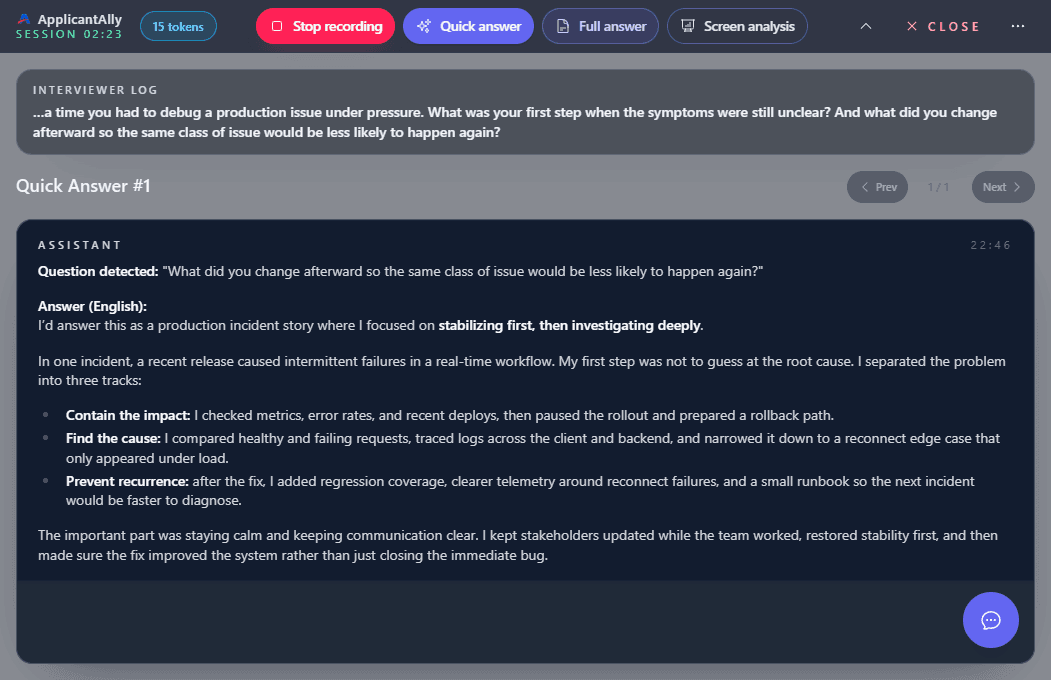
What copilot means here
An interview copilot is useful when a question changes direction before you have organized your answer. ApplicantAlly turns the live transcript and the context you supplied into a suggestion you can inspect. It does not take over the call, speak as you, or know experience you have not provided.
The live sequence
The desktop app receives your microphone and the meeting audio. A live transcript gives the assistant the question and recent conversation, including the turns that led to it.
Ask for Quick when you need the next talking point. Use Full when the question needs a more developed structure. You decide what to say and how to say it.
When the interviewer probes an answer, the next request can use the earlier exchange. You can respond to the new angle without starting the explanation from zero.
Quick or Full
A live interview rarely gives you time to read a long script. The desktop app offers two answer depths so you can choose what helps in the moment.
A compact next point when you need to begin speaking or recover after a short follow-up.
Use it to find a direction, then give the answer in your own words.
More structure for a question that needs an example, explanation, or technical trade-off.
Available in the native desktop app; read critically before using any detail.
Follow-up questions
Suppose you describe a production incident. The interviewer then asks what you changed afterward. A useful response needs the earlier incident, your actual role, and the new question. ApplicantAlly includes recent transcript and session context in a new request so its suggestion can stay connected.
You still need to check that the details match what you said and did. See the practical guide to interview follow-up questions.
Your background
Select a resume and the Job you are interviewing for before the call. When you ask for help, ApplicantAlly can use that context alongside the recent conversation. This is most useful when the question asks why your experience fits this role, or which of your projects is relevant.
Visible tasks
A coding prompt, architecture diagram, or case document may contain details the interviewer never reads aloud. Screen Analysis adds an image when you trigger it, so the suggestion can consider what is visible as well as what was said. It does not continuously scan the desktop.
See how Screen Analysis captures visible context, or explore the broader technical interview support, including live coding interviews.
Choose a surface
Separate microphone and system audio, Quick and Full answers, and on-demand Screen Analysis. Stealth Mode protects the desktop window in standard screen sharing. Use Remote Control from a phone if you prefer to keep your hands on the interview computer.
A browser workflow with microphone audio and, when the browser provides it, audio from a shared tab or screen. Quick and screen-based help are available in the current web interface.
Use a separate phone browser. Its microphone hears both sides as one mixed stream, so placement and room sound matter. Read the Web App options before choosing a setup.
FAQ
No. ApplicantAlly shows suggestions for you to read, adapt, and say in your own words. It does not join the call as another speaker or answer aloud for you.
ApplicantAlly uses recent transcript and session context when you request an answer, so a follow-up can be considered alongside the earlier discussion. Check the suggestion against what you actually said and the facts of your experience.
No. Screen Analysis adds a captured image when you request it. Ordinary Quick and Full answers rely on the conversation and the resume and job context you selected, without continuous screen analysis.
Interview rules vary. Use ApplicantAlly only where the process permits assistance, and keep your answers true to your own experience and ability.
Set up your resume and role, test your audio, and see how Quick and Full support fit a real conversation.